
Humanlike AI Voices for Instagram Reels

What Makes an AI Voice Sound Humanlike on Instagram?
A humanlike AI voice is more than one that sounds realistic. On a Reel, it has to sit with the hook, the pacing, the captions, the music, and the way the video is cut.
That's where a lot of AI voiceovers fall apart. They sound fine in a short preview, then you drop them into the edit and the delivery feels off: too flat, too slow, or too polished for what's happening on screen.
This walks through how to get there: pacing, pauses, emotion, pronunciation, voice style, captions, and editing in blocks.
TL;DR
- A realistic voice isn't enough. Pacing, emotion, pauses, and pronunciation are what make it read as human, and the voice has to fit the context.
- Reels want a fast hook and clear delivery, plus a voiceover that plays well with your captions and music.
- Robotic AI voices give themselves away by keeping the same tone and rhythm on every line.
- Narration Box helps here: edit the script in blocks, adjust the style, control the pacing, and regenerate just the parts that sound off.
- Always play the voiceover against the finished Reel before you post.
How to get a humanlike AI voice on Instagram
Instagram doesn't make the voice for you, so the trick is to build it elsewhere, export the audio, and drop it into your Reel, whether you edit in Instagram itself, CapCut, VN, or Premiere.
The process is short:
- Write a tight Reel script with a hook, a main point, and a CTA.
- Paste it into an AI voice tool like Narration Box.
- Pick a voice that suits the Reel.
- Adjust the pacing, pauses, emotion, pronunciation, or accent until it sits right.
- Play it back against your captions, music, and the finished edit.
- Export the audio and add it to your Reel.
Instagram voice effects vs humanlike AI voiceovers
Instagram's built-in voice effects are fine for quick, casual edits. They change how your recorded voice sounds inside the app, but they don't give you much say over the delivery, pacing, or pronunciation, and they won't keep a voice consistent from one post to the next.
An AI voiceover works differently. You start from a script, pick a voice, shape the delivery, and export clean audio to drop into your Reel. That's the better route for product demos, faceless pages, tutorials, and branded content, anywhere the voice needs to sound the same across a run of videos.
Why Robotic AI Voices Hurt Instagram Reels
Reels are short, so a weak voiceover shows up fast. If the voice is flat, or drags, or feels detached from what's on screen, people scroll before your point lands.
Usually the problem isn't that the voice sounds fake. It's that every line sounds identical. The hook, the explanation, the reveal, the CTA, all delivered at the same rhythm, and that flatness is the tell.
A good Instagram voiceover feels timed to the cut. It slows down when something needs to be clear, picks up when it needs energy, holds a beat before the moment that matters, and follows the mood of the Reel.
How to Use Narration Box Studio to Create a Humanlike AI Voiceover for Instagram Reels
A humanlike voiceover rarely comes from picking a good voice and exporting in one pass. It comes from working the script, timing the delivery, and fixing the lines that land too flat or too fast for the Reel.
Narration Box Studio lets you do that block by block, which matters because the hook, the middle, and the CTA almost never want the same delivery. The hook might need more energy, the middle more room to be clear, the CTA a clean pause before it lands.
Below is a practical way to build a Reel voiceover in Studio that actually sounds human.
1. Start with a Reel script that is written to be spoken
Before you generate anything, read your script out loud. A lot of AI voiceovers sound robotic because the script was written like a caption or a blog paragraph, not like someone actually talking.
For a Reel, keep it tight:
- Open with a short hook.
- Say your main point plainly.
- Break long sentences into shorter spoken lines.
- End on a CTA that sounds natural rather than tacked on.
A good Reel script reads more like speech than writing. If a line trips you up out loud, it'll trip up the voiceover too.
Write in Blocks
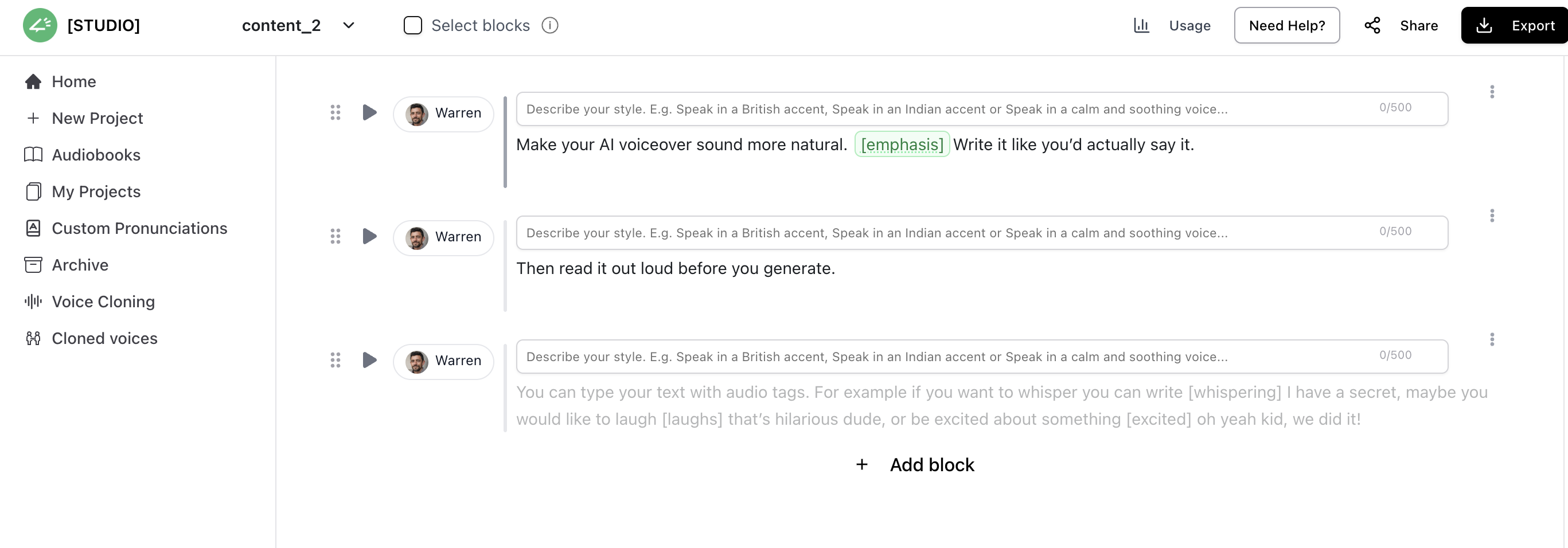
2. Split the script into blocks instead of keeping everything in one chunk
In Narration Box Studio, break the script into separate blocks before you start fine-tuning the voice. This is one of the easiest ways to make the final output sound more humanlike.
For example:
- Block 1: Hook
- Block 2: Main explanation
- Block 3: Product benefit or key point
- Block 4: CTA
This helps because each part of the Reel usually needs a different feel. The hook may need faster pacing. The explanation may need more clarity. The CTA may need a short pause before it lands.
If the entire script sits in one block, the voiceover can start sounding too uniform. Working in blocks gives you much more control over timing and delivery.
Example structure:
- Block 1: “Most AI voiceovers fail for one reason.”
- Block 2: “They sound fine in a preview, but flat inside a real Reel.”
- Block 3: “The fix is usually pacing, pauses, and delivery.”
- Block 4: “Here’s how to make it sound more human.”
3. Choose a voice style that matches the Reel format
A humanlike voice is not just a realistic voice. It is a voice that matches the type of Reel you are making.
Inside Narration Box Studio, choose the voice based on the format:
- Lifestyle or creator-led Reels: warmer and more conversational
- Product demo Reels: clear and confident
- Tutorial Reels: steady and instructional
- Storytelling Reels: warmer with more emotional range
- Faceless educational Reels: clean, neutral, and consistent
A mismatch here is one of the main reasons AI voiceovers feel unnatural. A strong voice in the wrong format can still feel off.
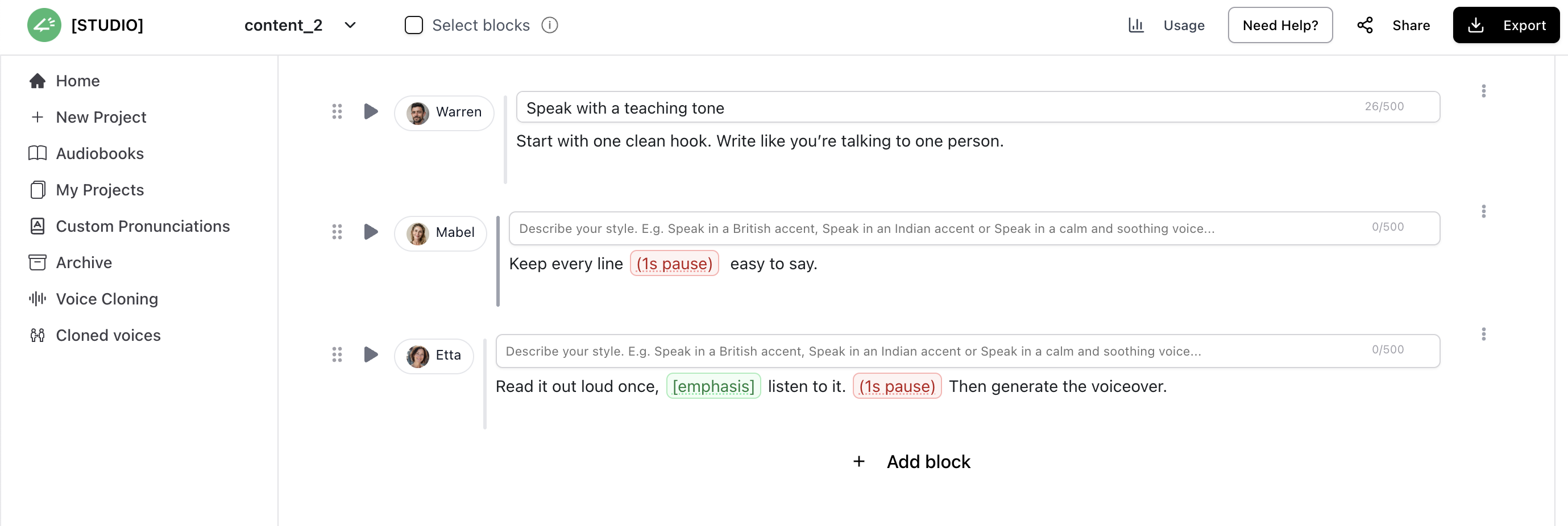
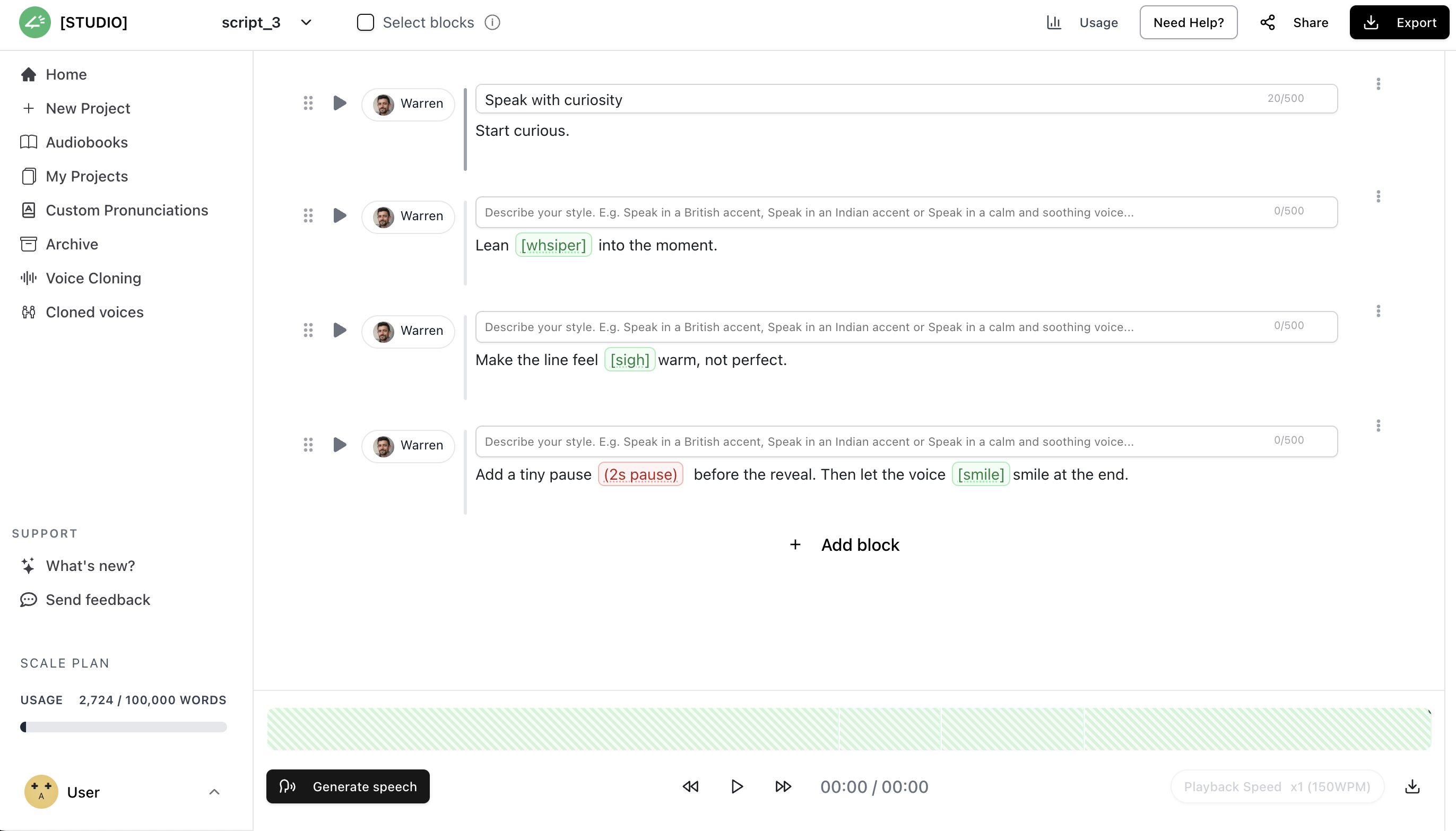
4. Shape the Delivery with Emotions, Pacing, Pauses, and Pronunciation
Once your script is in blocks, use Studio to shape how each part sounds. This is where it stops feeling like generic text-to-speech and starts feeling like a voiceover timed to the Reel.
Start with style instructions, kept plain, the way you'd actually say them:
- "Energetic and sharp for the hook."
- "Keep this calm and clear."
- "Make this sound like a creator recommending something."
- "Confident product-demo tone here."
- "Warm and natural."
- "Crisp and direct on the CTA."
Then work the details that make it feel human:
- Speed, if a line drags or rushes.
- Pauses, when a line needs a beat before a reveal or a CTA.
- Pronunciation, when a brand or creator name comes out wrong.
- Language or accent, if you're aiming at a specific audience.
- Emotion, when one part needs to be warmer or sharper than the rest.
The hook usually wants more energy, the middle wants clarity, the CTA wants room to land. Often it's one small fix, a pause, a speed change, a pronunciation tweak, that's the difference between robotic and intentional.
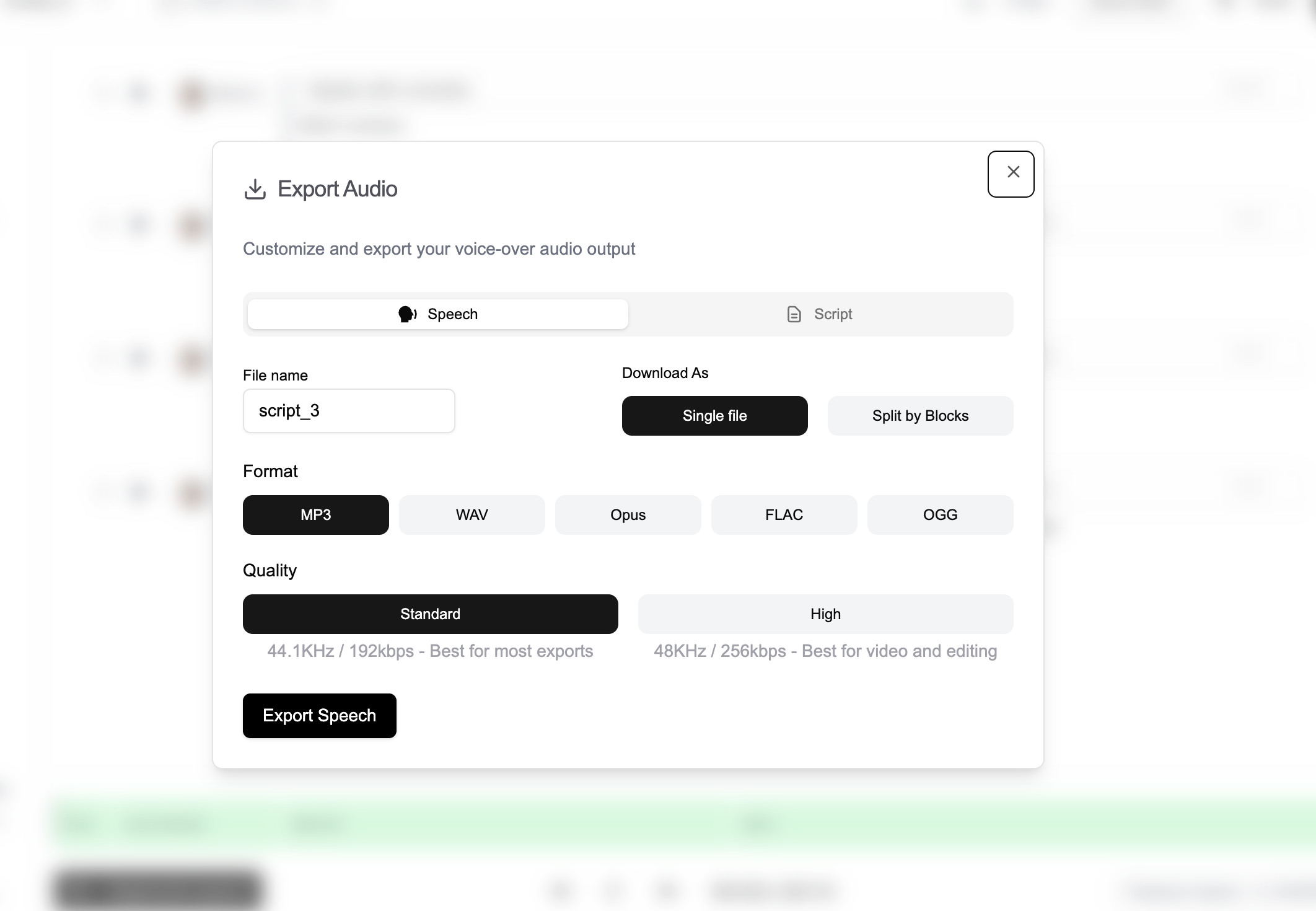
5. Export the Final Voiceover and Test It with the Reel Edit
Once the voiceover sounds right, export the audio and pull it into your editor, whether that's Instagram itself, CapCut, VN, Premiere, or Final Cut.
Before you publish, play it against the real edit and check a few things:
- Can you hear the voice clearly over the music?
- Do the captions line up with the timing?
- Does the hook land fast enough?
- Any lines coming out rushed?
- Does the CTA sound natural?
- Does the voice fit the mood on screen?
A voiceover that sounds great in Studio isn't the same as one that works in the Reel. It has to feel timed once the music, captions, and visuals are all sitting together.
Humanlike AI Voice Settings That Matter Most
|
Setting |
What it fixes |
How to use it for Reels |
|---|---|---|
|
Pacing |
Voice sounds too slow or rushed |
Speed up hooks, slow down explanations |
|
Pauses |
Voice sounds flat or robotic |
Add pauses before reveals, CTAs, or key points |
|
Emotion |
Delivery feels detached |
Match the mood of the Reel: warm, excited, calm, confident |
|
Pronunciation |
Names or local words sound wrong |
Fix brand names, creator names, product names, and mixed-language words |
|
Voice style |
Voice feels mismatched |
Use clear for tutorials, energetic for hooks, warm for storytelling |
|
Consistency |
Reels feel disconnected |
Keep a similar voice style across recurring Reel formats |
How to Create Humanlike AI Voiceovers for Instagram Reels
Making a humanlike voiceover for a Reel takes a handful of steps:
- Write a tight Reel script with a clear hook, a main point, and a CTA.
- Break it into smaller blocks so you can edit each part on its own.
- Pick a voice that suits the Reel.
- Give it direction, like energetic, calm, confident, or conversational.
- Adjust the speed, pauses, pronunciation, or accent wherever a block needs it.
- Play it back against your music, captions, and the finished edit.
- Regenerate only the lines that sound off.
- Export the audio and drop it into Instagram, CapCut, VN, or whatever you edit in.
Pro Tip: Always run a quick test Reel with friends or colleagues. If they replay it more than once, you’ve nailed both the pacing and emotional tone.
How Enbee V2 makes Instagram voiceovers sound more humanlike
Most AI voices sound fine in a quick demo, then go flat the moment you drop them into a real Reel. Reels move fast: the hook, a shift in mood, the CTA, each one needs a different delivery.
Enbee V2 is built for that kind of short-form work. Rather than reading every line at one level, it takes in the context of the script and lets you direct how the voice performs.
With Enbee V2, you can:
- Steer the delivery in plain language.
- Add emotional cues to specific moments.
- Adjust speed and pauses to match your captions and cuts.
- Set the language, accent, and pronunciation for localized Reels.
- Change settings block by block, so the hook and the CTA don't have to sound the same.
- Regenerate just the part that's off instead of rebuilding the whole thing.
That's what actually makes a voice feel human: not the raw voice quality, but the performance and timing you can control around it.
The Voices That Drive Engagement
Narration Box’s library is vast, but for Instagram Reels, the following stand out:
- Ariana: Intuitive, emotional, and natural; ideal for storytelling and personal branding.
- Steffan: Deep, professional, suited for brands and authoritative Reels.
- Jayden: Youthful and energetic; great for creators targeting Gen Z.
- Amanda: Friendly and warm; perfect for lifestyle or influencer Reels.
- Ananya (Hindi): Great for Indian creators looking to localize content.
- Mayu (Japanese): Sharp and vibrant; for anime, gaming, or cultural reels.
- Karina (Spanish-Puerto Rican): Lively and authentic, boosting relatability.
- Hamed (Arabic): Rich and engaging, ideal for educational or cultural niches.
- Yara (Brazilian Portuguese): Expressive and rhythmic; great for product showcases.
Each voice can be customized in pace, tone, and emotion. Unlike other platforms, Narration Box’s narrators are context-aware—they adapt to the script automatically.
Mistakes That Make AI Voices Sound Robotic
A few mistakes worth avoiding:
- Keeping the same tone from the first line all the way through the CTA.
- Writing every sentence at the same length.
- Skipping the pause before a moment that needs one.
- Picking a voice that doesn't fit the Reel.
- Leaving in long written-out sentences that get clumsy when spoken.
- Not checking how names, brands, or local words are pronounced.
- Judging the voice on its own instead of hearing it against the music and captions.
Most of the time, a humanlike voiceover comes from editing the script and the delivery together, not from finding one realistic voice.
Checklist Before Publishing an AI Voiceover Reel
- Your first line is short and clear.
- The voice suits the format of the Reel.
- The pacing keeps up with your captions and cuts.
- You've put a pause before each moment that needs one.
- You've checked how everything's pronounced.
- The CTA sounds natural rather than tacked on.
- You've heard the voiceover with the music, not just on its own.
- Anything that sounds awkward gets rewritten or regenerated.
Quick Tips to Make AI Voice More Humanlike
- Match tone to content: For emotional storytelling, use Ariana or an Enbee V2 voice with natural pacing and style control. Enbee V2 voices understand the script context, so the delivery can follow the mood without needing heavy manual adjustment.
- Adjust pacing: Shorter sentences for fast Reels, longer ones for explainer content.
- Add natural pauses: Narration Box voices handle this automatically.
- Layer with background music: Enhances emotional depth.
- Always preview in context: Test voice with video visuals to ensure synergy.
Best Practices and Metrics to Track
To maximize success with AI voices on Instagram:
- Track Watch Time: Aim for 70%+ average completion rate.
- Engagement Rate: Likes, comments, and shares should align with 5–10% of total reach.
- Follower Growth: Use consistent voice branding to build recognition.
- CTR from bio/links: Narrated calls-to-action perform better than text overlays.
Unconventional Tip: Reuse the same voice across your Reels series. Familiarity builds trust and makes audiences subconsciously more likely to replay.
Monetization Opportunities
With Instagram’s Reels Play Bonus and branded content deals, voice consistency directly influences monetization. Clear, professional AI voices help you:
- Sell more via shoppable Reels.
- Land brand partnerships (brands trust professional production).
- Expand into YouTube Shorts or TikTok with the same voiceovers.
Create Humanlike Instagram Voiceovers with Narration Box
Narration Box helps creators turn short Reel scripts into natural AI voiceovers with editable blocks, style controls, pauses, speed, language, accent, and pronunciation settings.
You can shape the hook, explanation, and CTA separately, then regenerate only the parts that need changes before exporting the final audio.
Frequently asked questions
Short answers to common questions about this topic.
What makes an AI voice sound humanlike on Instagram Reels?
Natural pacing, real pauses, some emotion, and pronunciation that fits the video. It should feel timed to the Reel rather than read flatly off the page.
How do I get an AI voice on Instagram?
Make the voiceover in a tool like Narration Box, export the audio, and add it to your Reel in Instagram, CapCut, VN, or Premiere.
How do I make AI voiceovers sound less robotic?
Keep your sentences short and spoken, drop in real pauses, and adjust the speed. Pick a voice that suits the video, then preview it with the music and captions rather than on its own. If a line sounds off, rewrite or regenerate just that part.
What's the difference between Instagram voice effects and AI voiceovers?
Instagram's voice effects filter audio you've already recorded, inside the app. An AI voiceover is generated from a script, so you control the style, pacing, pauses, emotion, pronunciation, and accent.
Can I use AI voices for Instagram Reels?
Yes. Just check the tool's commercial-use terms if the Reel is for a brand, a client, an ad, or a monetized account.