
Best Free AI Voice Generators for YouTube Voiceovers

What YouTube Creators Need from an AI Voiceover Tool
Finding a free AI voice generator for YouTube is easy. Finding one that sounds natural, allows commercial use, supports longer scripts, and gives you enough control to edit the voiceover later is harder.
For YouTube creators, the best tool depends on the type of video you make. Shorts need fast, expressive narration. Faceless videos need consistent voices across many uploads. Explainers and tutorials need clear pacing, pronunciation control, and easy edits.
This guide compares four free AI voice generators for YouTube videos , including where each one fits, what the free plan is useful for, and what limits you should check before using the audio in a monetized channel.
Free AI Voice Generators for YouTube: A Comparison
|
Tool |
Best for |
Free plan useful for |
Main limit |
|---|---|---|---|
|
Narration Box |
YouTube voiceovers, Shorts, faceless videos |
Editable AI narration |
Usage limits |
|
ElevenLabs |
Realistic voice tests |
Trying voices |
Commercial/download limits may vary |
|
LOVO |
Short creator voiceovers |
Testing voice styles |
Longer exports may need paid plan |
|
Narakeet |
Presentation narration |
Slide/script narration |
Less flexible for storytelling |
Narration Box is a solid pick if you want AI voiceovers you can actually edit — good for YouTube scripts, commercial-use audio , and juggling multiple voices, with control over pacing, pauses, accent, language, and speed. If you're mainly auditioning realistic voices, ElevenLabs and LOVO are worth a look. Narakeet is the better fit for straight presentation narration.
What an Editable YouTube Voiceover Setup Looks Like
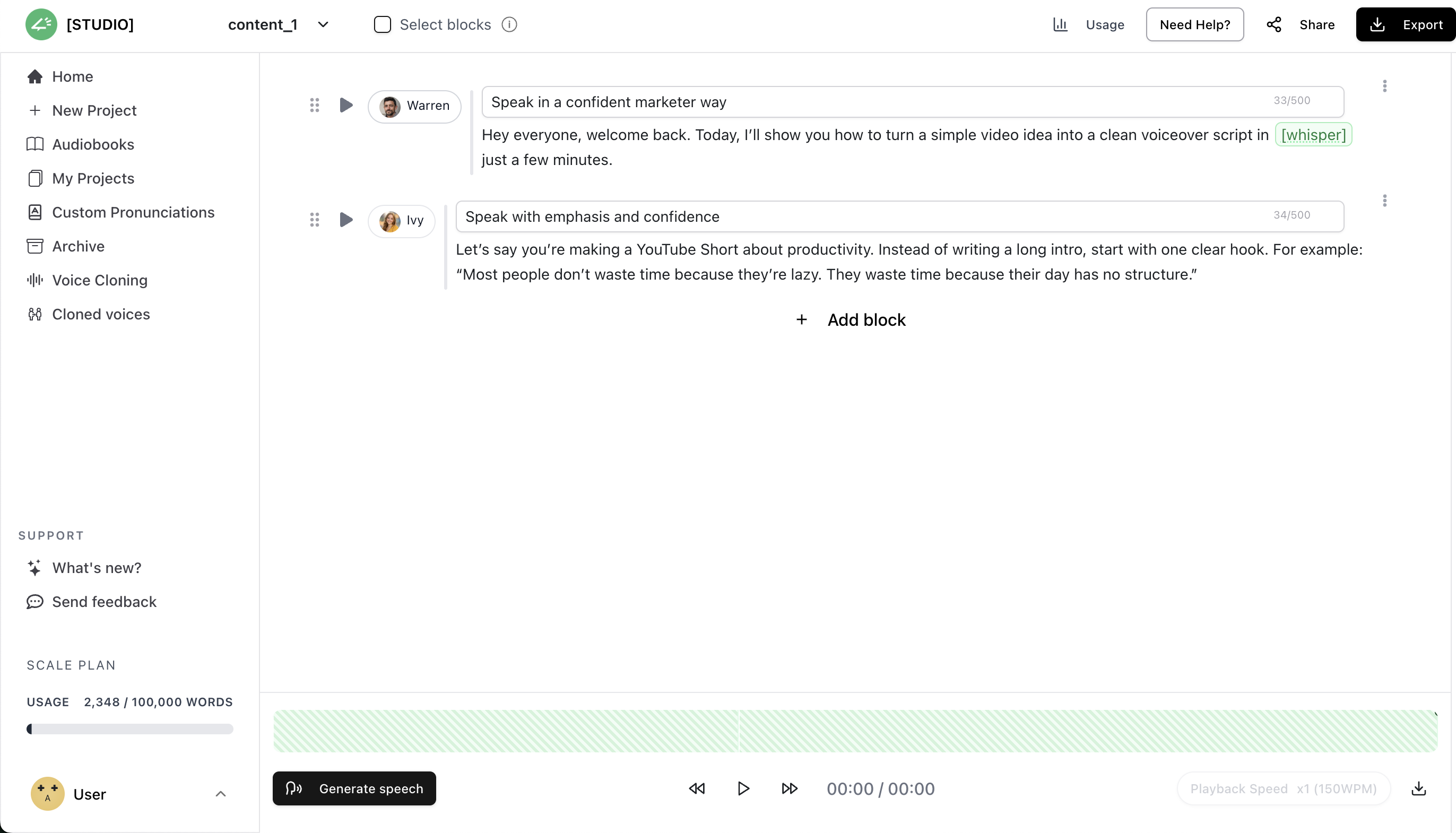
A YouTube voiceover almost always changes after you hear it back. The hook needs more punch, one line rushes past, a brand name comes out wrong. That's why being able to edit in blocks beats just landing on a realistic voice.
Why AI voiceover speeds up a YouTube channel
This is aimed at people under time pressure: daily Shorts creators, faceless channels pushing toward monetization, educators and vloggers fighting for watch time, and agencies with a full queue.
For that kind of work, recording narration yourself is the bottleneck. You need something that sounds like it means what it's saying, turns around in minutes, and doesn't involve a mic or a hired voice — plus the option to swap languages or change tone when a project calls for it.
That's where AI narration earns its place. It handles hundreds of languages and adjusts delivery to fit the script, so it slots into a production routine instead of adding a step.
Best Free AI Voice Generators for YouTube Voiceovers
1. Narration Box: Best for Editable YouTube Voiceovers with emotions
Narration Box is a good fit if you want YouTube voiceovers you can actually edit, plus commercial-use rights and real control over how the narration sounds. It has 1,500+ voices across 80+ languages, with localized accents.
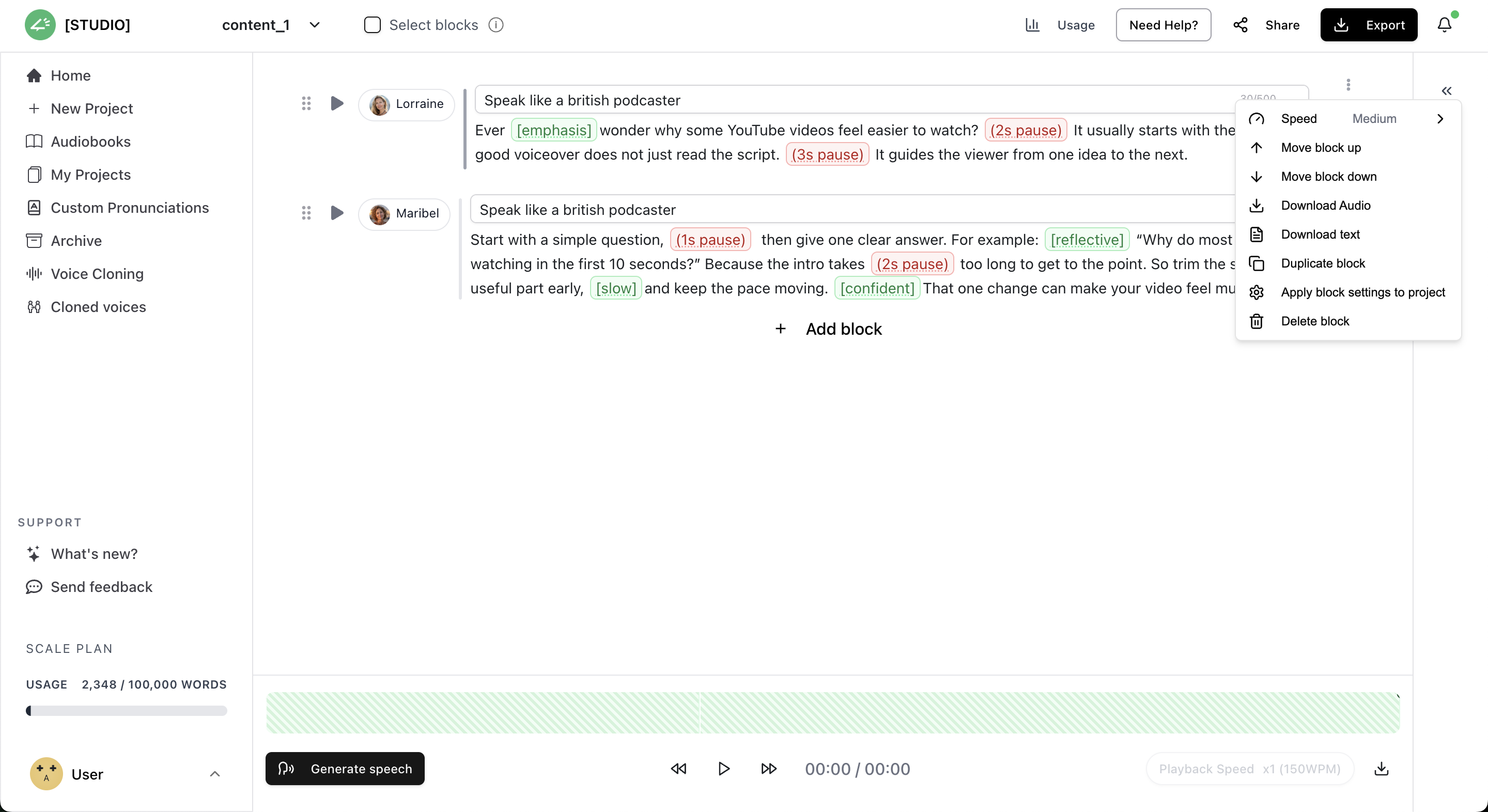
Voice Style and inline emotion control Controls
What makes Narration Box different for YouTube voiceovers:
- The voices read your full script before performing, so the narration doesn't reset its tone every sentence, which is the usual giveaway with cheaper AI voices across Shorts, explainers, and faceless videos.
- You direct delivery in plain language, with prompts like "sound energetic," "keep it calm," or "documentary tone."
- Emotion, pauses, speed, language, pronunciation, and accent are all adjustable, so the voice matches the video instead of sounding generic.
- Editing works in blocks, so if one section comes out wrong you fix that block instead of regenerating the whole track.
- Reuse the same narrator and a channel keeps one consistent voice across a series.
Best for:
- Faceless explainer videos
- Storytelling that needs real emotion
- Educational content in multiple languages
- Hyper-localized videos where a dialect-specific voice matters
Pro tip: The Enbee V2 voices are the expressive set. Reach for those on Shorts, tutorials, and anything story-driven.
2. ElevenLabs: good for realistic AI voice tests
ElevenLabs is one of the better-known AI voice tools, and it's handy when you just want to hear how a voice sounds before committing it to your channel. The voices are realistic, which makes it a solid place to audition options and record short clips.
Best for:
- Quick voice tests
- Realistic demos
- Simple creator voiceovers
- Comparing a few voice styles side by side
Limitations: The free plan, download rules, commercial rights, and the fancier voice features tend to shift over time. Check the current terms before you put ElevenLabs audio in a monetized YouTube video.
What makes this so obviously AI generated? The "Best for" list is still four evenly weighted fragments, and the intro doesn't say anything you couldn't guess. But for a short listicle entry, that's about as tight as it gets. Cut curly quotes, dropped the hyphens in "free-plan," turned the copula-heavy intro into plain sentences, and gave the limitation a real caution instead of a flat feature list.
3. LOVO: good for short voiceover narration tests
LOVO is built for creators, marketers, and teams putting together narrated content, and the interface is clean enough that you're not fighting it. It works well for shorter jobs: quick scripts, product videos, listicles, and basic faceless clips.
Best for:
- Product review videos
- Short marketing videos
- Listicle-style narration
- Trying out different English voices
Limitations: Once you get into longer scripts, finer voice control, exports, or commercial use, check what the current plan actually covers. A few of the voices also need some tweaking before they sound right across a full video.
4. Narakeet: good text-to-speech narrator for presentations
Narakeet fits when your video is really a narrated presentation, lesson, or slideshow rather than entertainment. You can feed it a script or a document and it narrates from that, which is handy if you're teaching.
Best for:
- Narrated presentations
- Educational videos
- Training videos
- Slideshow-based YouTube content
- Language-learning videos
Limitations: Narakeet gets stiff if you want emotional delivery, character voices, or tight control over pacing. For Shorts, storytelling, or faceless entertainment, you'll probably be happier with a tool built more for creators.
How to turn a YouTube script into an AI voiceover without redoing the whole thing
Most AI voice tools are fine for a quick test, but a real YouTube script never comes out right on the first pass. You hear it back and want to punch up the hook, rewrite a line, drop in a pause, fix how it says a name, or change the voice style entirely.
Narration Box lets you work in blocks instead of one long take. Each block carries its own voice, language, accent, speed, pauses, pronunciation, and style notes, so you can fix one stretch without regenerating the entire file.
That comes in handy in the usual spots:
- The intro's a bit flat and needs more energy.
- A tutorial step is running too fast and needs to slow down.
- A faceless channel needs the same narrator across every upload.
- A brand name keeps getting mangled and needs a custom pronunciation .
- A Shorts script needs quicker delivery than your long-form explainers.
- One section calls for a different voice or accent.
That's really the line between a plain text-to-speech reader and a voiceover editor built for people who publish over and over.
Tips to make AI voiceovers sound better on YouTube
- Preview a few voices before you settle. The right one depends on the video.
- Keep sentences on the shorter side. AI narrators lose the thread on long lines, so break them up the way you'd actually say them.
- Play the finished audio for someone who hasn't heard it. If they can't tell it's AI, you're there.
- Don't treat narration as the whole job. Music and pacing carry as much of the video as the voice does.
Best AI voice for YouTube Shorts
Shorts need a voice that's clear, quick, and has some expression without tipping into melodrama. The pacing is fast, the first line has to land, and the pauses still have to feel natural. Narration Box holds up here because you can audition voices, accents, and styles, then regenerate just the blocks that aren't working instead of redoing the whole thing.
Can AI voiceovers be monetized on YouTube?
Yes, you can use AI voiceovers on YouTube, including on monetized videos. The catch is that the video still has to be worth watching on its own. The voiceover supports the video; it doesn't replace real scripting, decent visuals, editing, and a reason for anyone to click.
Before you commit to a free AI voice tool, read its commercial-use terms. Some allow commercial use on the free plan; others lock downloads, monetized use, client work, or the better voices behind a paid tier.
For creators, the safer question isn't just "is this AI voice generator free?"
It's "can I legally use this narration in videos that might earn money?"
Best practices for AI voiceover narration on YouTube
- Test the final audio on fresh ears. If a friend can't tell it's AI, you've done your job.
- Keep the same voice across a series so viewers recognize the channel.
- Give music and pacing real attention. The voice is only one part of what keeps people watching.
- Match your visuals to the emotional beats of the narration.
- If you're juggling several scripts at once, something like Narration Box's Studio makes the edits easier to manage.
Create Free AI Voiceovers for YouTube with Narration Box
If you want more control than plain text-to-speech gives you, Narration Box is worth a try, and it's free to start. Paste in your script, edit it block by block, pick a voice that actually fits, and adjust the style and pacing until it sounds right. Then export for Shorts, tutorials, explainers, faceless videos, or content in another language.
No mic or recording setup needed.
Frequently asked questions
Short answers to common questions about this topic.
Can AI voiceovers be monetized on YouTube?
Yes, as long as the tool's commercial terms allow it. Check whether the free plan actually covers monetized videos, downloads, ads, and client work before you rely on it.
What is the best free AI voice generator for YouTube videos?
It depends on the kind of video you make. Narration Box is a good pick if you want editable voiceovers for faceless videos, Shorts, tutorials, or multilingual narration. ElevenLabs and LOVO are handy for auditioning voice styles, and Narakeet is the better fit for presentation-style narration.
Are AI voiceovers allowed on YouTube?
They're allowed. What gets penalized is low-effort, repetitive content, which tends to underperform and can run into monetization trouble. Write original scripts, use visuals that add something, and edit properly.
What should I check before using a free AI voice generator for YouTube?
Look at the commercial-use rights, download options, and any word or character limits. Then check the things that decide whether it's usable day to day: voice quality, editing controls, pronunciation support, and whether the voice still sounds natural across a whole script rather than just a demo line.
Which AI voice generator is best for faceless YouTube channels?
You want consistent voices, quick script edits, natural narration, and commercial rights on the audio. Narration Box works well if you publish often and need to keep the same voice across every video in a series.
What's the difference between an AI voice generator and a text-to-speech narrator?
Plain text-to-speech mostly just reads your text aloud, with little say over how it sounds. A stronger AI voice generator lets you shape the style, emotion, pacing, pauses, language, and accent, and edit the script as you go, which is what actually matters for YouTube.