
Convert PDF to Audiobook with AI in 3 Step

You can convert a PDF into an audiobook by extracting clean text from the PDF, preparing it for narration, generating chapter-by-chapter audio with an AI narrator, and checking the final files for pronunciation, pacing, metadata, and audiobook platform requirements.
The important part is not only “PDF to audio.” A PDF is built for reading, not listening. Page numbers, headers, footers, footnotes, broken line breaks, hyphenated words, tables, image captions, and layout artifacts can make an AI narrator read the wrong thing. A good PDF-to-audiobook workflow cleans the manuscript before generation and checks the audio before publishing.
Use this workflow if you are an author, teacher, publisher, researcher, coach, or course creator turning a PDF book, guide, report, training manual, or manuscript into narrated audio.
Fast Workflow
|
Step |
What to do |
Why it matters |
|---|---|---|
|
1. Clean the PDF text |
Remove page numbers, headers, footers, broken line breaks, and layout noise |
Prevents the AI narrator from reading unwanted text |
|
2. Choose the narrator |
Pick an AI voice that matches the genre, audience, and listening context |
Improves retention and reduces listener fatigue |
|
3. Generate and QA audio |
Create chapter files, check pronunciation, pacing, credits, and export specs |
Helps prepare the audiobook for publishing or private use |
If you want to test the workflow, start with one chapter instead of the full PDF. A 10-minute sample will reveal voice fit, formatting issues, pronunciation problems, and pacing before you spend time generating the entire audiobook.
PDF to Audiobook Requirements
A PDF-to-audiobook project needs four things before production starts.
- A clean text version of the PDF
- A narrator voice that fits the book
- Chapter or section breaks
- A final audio QA pass
For short PDFs, you can often clean the text quickly. For full books, textbooks, research PDFs, or training manuals, the preparation step matters more. The more complex the layout, the more likely the raw PDF text will contain errors.
Common PDF issues include:
- Page numbers read as narration
- Headers repeated on every page
- Footers mixed into paragraphs
- Words broken by line hyphenation
- Tables read in the wrong order
- Captions read without context
- Footnotes interrupting the main text
- Chapter titles missing from extracted text
- Dialogue spacing broken across lines
- Special characters read incorrectly
Before using an AI audiobook creator , clean these problems from the manuscript.
Step 1: Prepare the PDF for Narration
The first step is to turn the PDF into clean, listenable text.
Do not upload a messy PDF and expect perfect narration. Even a strong AI narrator will read the text it receives. If the file includes page artifacts, the audio will include those artifacts too.
Clean the PDF by checking:
- Chapter titles
- Section headings
- Paragraph breaks
- Dialogue formatting
- Page numbers
- Headers and footers
- Footnotes and endnotes
- Tables and charts
- Image captions
- Legal or copyright pages
- Dedication and acknowledgments
- Author notes
- Pronunciation-sensitive names and terms
For nonfiction, make headings clear and remove repeated layout text. For fiction, preserve scene breaks, dialogue, italics where meaningful, and chapter pacing. For educational PDFs, rewrite tables or diagrams into short spoken explanations.
A good rule: if the text sounds awkward when read aloud by a person, fix it before generating AI narration .
Step 2: Choose an AI Narrator
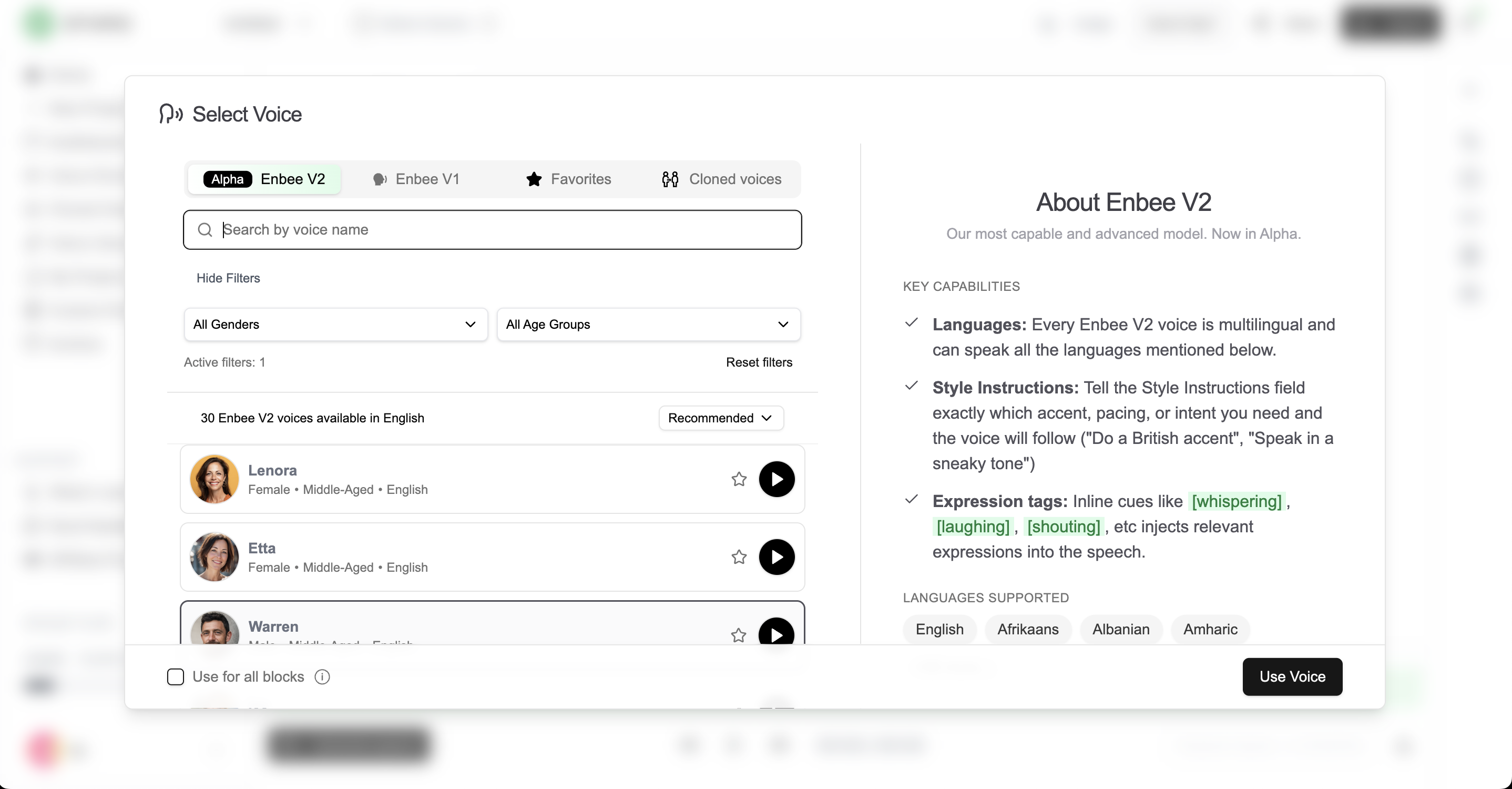
The second step is to choose a narrator that fits the content.
A PDF book can become many types of audio: audiobook, course narration, internal training audio, podcast-style chapters, accessibility audio, or private listening files. The right voice depends on that use case.
Use this guide:
|
PDF type |
Best narrator style |
|---|---|
|
Fiction book |
Warm, expressive, controlled, scene-aware |
|
Memoir |
Personal, intimate, emotionally steady |
|
Business book |
Clear, confident, direct |
|
Academic PDF |
Neutral, precise, low-distraction |
|
Training manual |
Calm, instructional, consistent |
|
Children’s book |
Bright, expressive, slower pacing |
|
Self-help book |
Reassuring, clear, conversational |
|
Technical documentation |
Accurate, steady, pronunciation-focused |
If you want readers to hear your own voice, use voice cloning only with a voice you own or have permission to use. For author-narrated audiobooks, cloning your own approved voice can keep the audiobook personal while still avoiding a full recording session.
In Narration Box Studio , create a short test from one representative chapter. Listen for clarity, pacing, pronunciation, emotional fit, and fatigue. Do not judge a narrator from one sentence. Long-form audio needs a voice that remains comfortable for hours.
Step 3: Generate, Edit, and Export Chapter Audio
The third step is to generate the audiobook in chapters or sections.
Avoid generating one giant audio file from the full PDF. Audiobooks are easier to review, edit, export, and publish when each chapter is separate.
A practical structure looks like this:
- Opening credits
- Introduction
- Chapter 1
- Chapter 2
- Chapter 3
- Remaining chapters
- Bonus material
- Closing credits
After generation, listen to each chapter and fix only the sections that need work. In Narration Box, block-level editing helps you regenerate a paragraph, section, or chapter without rebuilding the entire audiobook.
Check each chapter for:
- Wrong pronunciation
- Rushed pacing
- Missing pauses after headings
- Repeated text from the PDF
- Skipped paragraphs
- Broken dialogue
- Flat emotional delivery
- Inconsistent voice settings
- Audio glitches around edited sections
- Incorrect chapter order
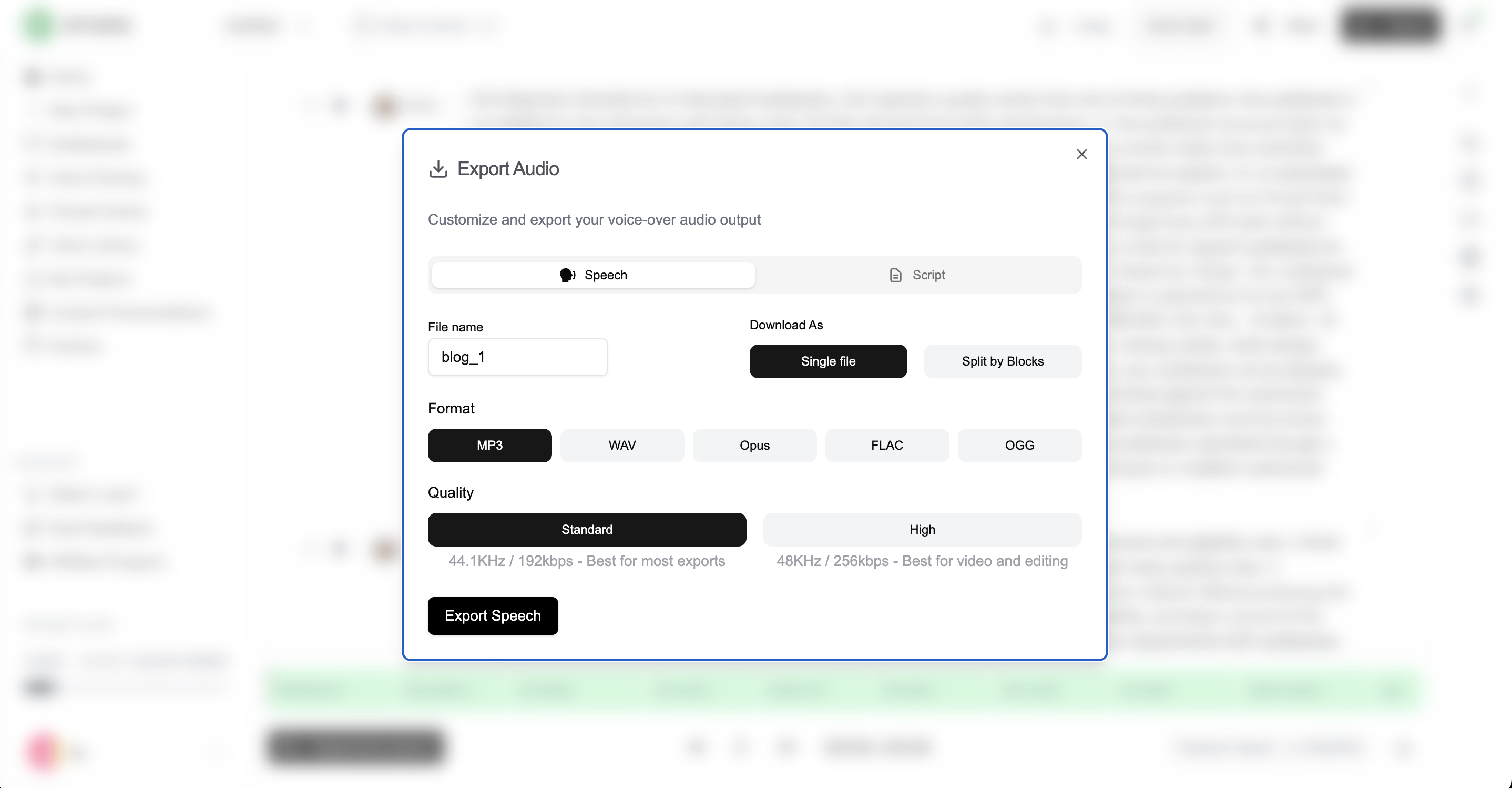
For publishing, export files in the format required by your platform. If you plan to upload to ACX, run the files through the ACX Compliance Checker and confirm the current platform rules before submission.
PDF Cleanup Checklist
Use this before generating audio.
- Remove page numbers.
- Remove repeated headers and footers.
- Fix broken line breaks.
- Fix hyphenated words split across lines.
- Keep chapter headings consistent.
- Turn tables into spoken summaries.
- Move footnotes to the end of the section or remove nonessential ones.
- Add descriptions for important charts or figures.
- Remove duplicate copyright or disclaimer text if it repeats.
- Check names, places, acronyms, and technical terms.
- Make scene breaks and section breaks obvious.
- Save a clean narration-ready version of the manuscript.
This step is where many PDF-to-audiobook projects succeed or fail. Clean text creates cleaner narration.
Audiobook Quality Checklist
Use this after generation.
- The narrator voice matches the book’s genre.
- The first chapter sounds good enough to continue for hours.
- Names and key terms are pronounced correctly.
- Chapters start and end cleanly.
- Pauses feel natural.
- Dialogue is understandable.
- Section headings do not sound abrupt.
- No page numbers or footer text are read aloud.
- Regenerated blocks match surrounding audio.
- Opening and closing credits are included if needed.
- Files are named in chapter order.
- Export settings match the publishing platform.
If your goal is commercial publishing, do not skip the final listen. A file can sound impressive in a short sample and still fail across a full audiobook.
PDF to Audiobook for Different Use Cases
Authors
Authors should treat the PDF as a manuscript, not a finished audio script.
Remove layout artifacts, preserve chapter structure, and test the narrator on a real scene. Fiction authors should check dialogue and emotional pacing. Nonfiction authors should check clarity, emphasis, and chapter flow.
Useful links:
Teachers and Course Creators
Teachers should convert PDFs into structured lessons, not one long narration file.
Break the PDF into modules, lessons, examples, summaries, and review sections. A training PDF often needs shorter audio segments than a book because learners need clear stopping points.
Useful link:
Businesses
Businesses should turn PDF guides, onboarding manuals, help docs, and product explainers into reusable audio assets.
Use one consistent narrator for brand trust. Keep sections short. Regenerate audio whenever product details change.
Useful link:
Publishers
Publishers should standardize the workflow across multiple books.
Create a repeatable process for PDF cleanup, narrator selection, pronunciation rules, chapter exports, QA, and metadata. This reduces production time and keeps quality consistent across a catalog.
PDF to Audiobook Mistakes to Avoid
Uploading the Raw PDF Without Cleaning It
Raw PDFs often contain text that should not be narrated. Clean the file first or the audiobook may include page numbers, footers, broken words, and awkward layout artifacts.
Choosing a Voice from a Short Demo Only
A voice can sound good for 20 seconds and become tiring after 3 hours. Test at least one full chapter before generating the whole audiobook.
Exporting One Long Audio File
One long file is hard to review, edit, and publish. Export by chapter or section.
Ignoring Pronunciation
Names, acronyms, academic terms, and fictional words need a pronunciation pass. One recurring mispronunciation can damage the entire audiobook.
Skipping Platform Checks
Audible, ACX, Spotify, Kobo, and private LMS platforms can have different file and metadata rules. Check the destination before final export.
Estimating Audiobook Length from Page Count Only
Page count is a rough estimate. Word count is more reliable. Use the Words to Minutes Calculator to estimate narration length before production.
Final Recommendation
The fastest reliable way to convert a PDF to an audiobook is to clean the PDF first, generate one chapter as a test, fix pronunciation and pacing, then produce the full audiobook chapter by chapter.
Use Narration Box when you need more than basic read-aloud audio. It is better suited for authors, educators, and teams who need editable AI audiobook narration, voice cloning, pronunciation control, chapter workflows, and export-ready audio.
Start with a short sample, listen carefully, then scale the workflow across the full PDF.
Start creating your audiobook in Narration Box or explore the AI audiobook creator .
Frequently asked questions
Short answers to common questions about this topic.
Can I convert a PDF to an audiobook with AI?
Yes. You can convert a PDF to an audiobook with AI by cleaning the PDF text, choosing an AI narrator, generating chapter audio, and checking the final files for pronunciation, pacing, and export quality.
Can ChatGPT turn a PDF into an audiobook?
ChatGPT can help clean, summarize, or rewrite PDF text, but it does not create the finished audiobook audio by itself. Use Narration Box to generate the AI narration and export audio files.
How do I convert a PDF book to an audiobook?
Clean the PDF, split the manuscript into chapters, choose an AI narrator, generate a test chapter, fix pronunciation and pacing, then export the full audiobook chapter by chapter.
Can I convert a PDF to audiobook for free?
You can test PDF-to-audiobook conversion with a free plan or short sample workflow, but full books usually need more generation time, exports, and editing controls. Check the current pricing before producing a full-length audiobook.
What is the best AI tool to convert PDF to audiobook?
Narration Box is a strong option for PDF-to-audiobook projects because it supports AI audiobook narration, voice cloning, editable projects, pronunciation control, and long-form chapter workflows.
How long is a PDF audiobook?
Audiobook length depends on word count, not page count. As a rough planning estimate, 9,000 to 9,500 words is about one finished hour of narration. Use the Words to Minutes Calculator at Narration Box for a better estimate.