
How to Fix Mispronounced Character Names in an AI Audiobook
Written by
Team Narration BoxPublished

To fix mispronounced character names in an AI audiobook , do not regenerate the whole book first. Build a pronunciation list, mark every recurring name and invented term, save pronunciation rules where supported, test the difficult names in short audiobook blocks, then regenerate only the affected sections after the rule is corrected.
That last part matters. In long-form AI audiobook narration , the real cost of a bad name is not the wrong syllable. It is the rework. A character name can appear 300 times across a book. If your AI audiobook narrator says it three different ways, you now have a continuity problem, a proofing problem, and a publishing-quality problem.
Narration Box is built for this kind of repair because audiobook production is block-based. You can control pronunciation for supported voices, keep names consistent across chapters, and edit or regenerate the specific blocks that need a new take instead of rebuilding approved audio from scratch.
Why character names break AI audiobook production
Most audiobook mistakes are easy to spot when you read the manuscript. Pronunciation mistakes are different. They hide in plain sight until you listen.
A name like "Mara" might be read as "MAH-rah" in chapter one and "MARE-uh" in chapter seven. "Aurelian" might sound correct in narration but wrong in dialogue. A fantasy place name might be pronounced one way by the narrator and another way by a character voice. A surname might look ordinary in English but follow a family, regional, or invented pronunciation that the AI voice cannot infer from spelling alone.
This is especially common in:
- Fantasy, sci-fi, and historical fiction
- Fiction with invented languages or family names
- Memoirs with personal names, towns, schools, and local references
- Nonfiction with specialist terms, researchers, brands, acronyms, and foreign words
- Publisher backlists where the manuscript was never prepared for narration
A standard AI audiobook generator may produce a listenable first draft, but names are where production control starts to matter. If the tool treats the whole book as one giant output, every correction becomes expensive. If the tool lets you work in chapters, paragraphs, and blocks, the fix is smaller.
The production rule: fix pronunciation before you chase performance
When a name is wrong, it is tempting to change the voice, add emotion, rewrite the sentence, or regenerate the whole chapter. That usually wastes time.
Separate the problem first.
Ask:
- Is the name pronounced wrong?
- Is the name pronounced inconsistently?
- Is the name correct, but stressed awkwardly in the sentence?
- Is the pronunciation fine, but the character voice or emotion is wrong?
- Is the issue caused by punctuation, abbreviation, or formatting in the manuscript?
Each answer needs a different fix.
If the name itself is wrong, use pronunciation control first. If the name is correct but the delivery feels flat, use style instructions, pacing, pauses, or a different narrator. If the same name changes across chapters, you need a saved rulebook, not random retries.
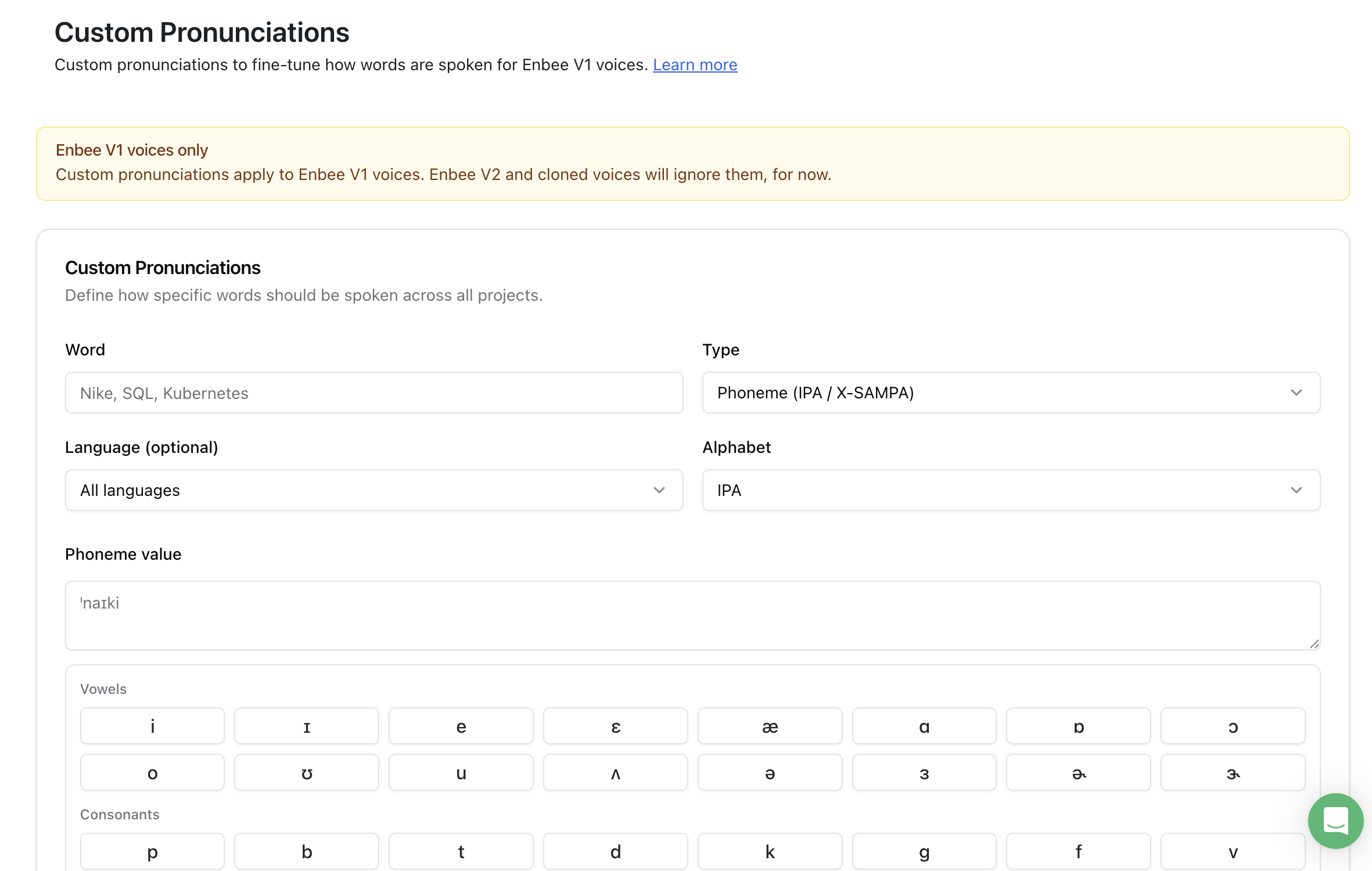
This is the kind of rulebook the article is talking about. In Narration Box, Custom Pronunciations let you define how a repeated word should be spoken before you generate long audiobook sections, so a character name does not drift from chapter to chapter. For now, these pronunciation rules apply to supported Enbee V1 voices.
Build a pronunciation sheet before generating the full audiobook
For any serious AI audiobook project, create a pronunciation sheet before full generation. This sounds boring. It saves hours.
Use a simple table like this:
|
Term |
Type |
Preferred pronunciation |
Where it appears |
Notes |
|---|---|---|---|---|
|
Mara |
Character name |
MAH-rah |
Chapters 1, 2, 4, 9 |
Do not read as MARE-uh |
|
Aurelian Gate |
Place name |
aw-REE-lee-un gate |
Chapters 3, 7 |
Stress second syllable |
|
Dr. Elian Voss |
Character name |
EE-lee-un Voss |
Chapters 2, 6, 11 |
Keep title formal in narration |
|
Caelora |
Invented term |
kay-LOR-ah |
Chapters 7, 14 |
Machine name |
|
Thorne & Vale |
Company name |
thorn and vayl |
Chapter 10 |
Say ampersand as "and" |
For fiction, include every recurring character name, nickname, family name, place, invented word, spell, artifact, organization, and title. For nonfiction, include author names, case-study names, acronyms, scientific terms, product names, legal terms, medical terms, and brand-specific language.
Do not wait until the final proofing pass to do this. By then, the mistake may already be spread across dozens of generated files.
The six types of name problems to look for
1. Wrong vowel sound
This is the most common issue. The spelling allows more than one reading.
Examples:
- "Mara" as MAH-rah or MARE-uh
- "Elian" as EE-lee-un or ELL-ee-un
- "Liora" as lee-OR-ah or lie-OR-ah
Fix it with a pronunciation rule or a phonetic spelling in the pronunciation field.
2. Wrong syllable stress
The letters are mostly right, but the stress is wrong.
Example:
- "Aurelian" read as aw-ree-LEE-un instead of aw-REE-lee-un
This is easy to miss because the word may sound almost correct. Listen for stress, not just letters.
3. Different readings across chapters
This happens when a name appears in different sentence shapes.
Example:
- "Caelora" sounds correct when alone
- The same word changes when followed by a comma, dialogue tag, or possessive form
Test names inside real sentences, not only as standalone words.
4. Abbreviations and titles
AI narration can stumble on titles, initials, suffixes, and abbreviations.
Examples:
- "Dr. Voss" read too casually
- "J. R. Alwen" read without clean spacing
- "St. Maren" read as "street" instead of "saint"
For audiobook narration, write the spoken form when needed. The manuscript can say "Dr.", but the narration text may need "Doctor" if the output is inconsistent.
5. Invented words that look like real words
Fantasy and sci-fi names often borrow familiar letter patterns.
Example:
- "Vale" may be read like the English word "veil"
- "Cael" may be read as "kale," "sail," or "kay-el"
If the word is invented, the AI narrator has no real-world context. Give it one.
6. Character voice drift
This is not always a pronunciation issue. Sometimes the name is correct, but a character says it with a strange tone, wrong emotion, or different accent.
Use style instructions and narrator selection for delivery. Use pronunciation rules for the word itself. Keep those controls separate.
How to fix mispronounced names in Narration Box
Step 1: Start with a small test scene
Before generating the full book, choose a scene that contains the hardest names. Ideally, pick a passage with narration and dialogue.
Use a section that includes:
- The protagonist's name
- A place name
- One invented term
- One title or abbreviation
- A sentence where the name appears before punctuation
- A sentence where the same name appears in dialogue
This gives you a better test than a clean list of names. Audiobook problems happen in context.
Step 2: Create or import the audiobook project
Use Narration Box's audiobook workflow when you are turning a manuscript, EPUB, PDF, or DOCX into long-form narration. The Audiobook Creator is designed for chapter-based production, while the broader Studio works well when you want block-level control over scripts and sections.
If your source is a book file, start with the relevant workflow:
- Book to audiobook for manuscripts and complete books
- Ebook to audiobook for EPUB-style book projects
- PDF to audiobook when your source needs cleanup after extraction
Clean the manuscript text before generation. Remove repeated headers, page numbers, footnotes that should not be read aloud, broken line breaks, and formatting artifacts. Pronunciation repair is much harder if the text itself is messy.
Step 3: Save pronunciation rules for recurring names
In Narration Box, Custom Pronunciations are available with supported Enbee V1 voices. Use them for names and terms that must stay consistent across the audiobook.
A good pronunciation rule should be simple. Do not write a paragraph explaining the word. Write the spoken form.
Examples:
|
Written term |
Better pronunciation entry |
|---|---|
|
Mara |
MAH-rah |
|
Aurelian |
aw-REE-lee-un |
|
Caelora |
kay-LOR-ah |
|
Dr. Elian Voss |
Doctor EE-lee-un Voss |
|
Thorne & Vale |
Thorne and Vayl |
If the first version still sounds wrong, try a more literal spelling. For example, "kay-LOR-ah" may work better than "Caelora" because it tells the narrator what to say instead of asking it to infer the sound from the original spelling.
Step 4: Keep affected passages in editable blocks
This is where block-based audiobook narration matters.
If a name appears in a paragraph that is likely to need repair, keep that passage easy to isolate. In Narration Box Studio, blocks can be edited and regenerated independently. That means a pronunciation mistake in one paragraph does not force you to rebuild every finished chapter.
For dialogue-heavy fiction, use blocks or paragraph-level structure to keep speaker changes, emotional beats, and difficult names manageable. Voice switching should be treated at the block or paragraph level, not as a word-by-word trick.
Step 5: Generate the test scene and listen without reading
When you proof the first sample, listen once without looking at the manuscript. This catches what a listener hears.
Mark:
- Any name that sounds wrong
- Any name that changes between narration and dialogue
- Any place where the narrator hesitates
- Any word that sounds technically correct but unnatural
- Any title, acronym, or invented term that breaks the flow
Then listen again while reading the text. This second pass helps you locate the exact block that needs repair.
Step 6: Correct the rule, not just the sentence
If the same name appears throughout the book, do not fix only the sentence where you noticed it. Fix the underlying pronunciation rule.
Then regenerate the affected block or chapter and listen again.
This is the difference between a quick patch and a production fix. A quick patch repairs one line. A pronunciation rule protects the rest of the audiobook.
Step 7: Freeze the pronunciation rulebook before batch generation
Once the test scene is clean, freeze the rulebook before generating long sections.
"Freeze" does not mean you can never edit it. It means you stop casually changing name pronunciations after chapters have already been approved. If you change the pronunciation of a major name halfway through production, you need to find every earlier instance and decide whether it needs regeneration.
For an AI audiobook maker , this is one of the most important quality-control habits: approve the pronunciation system before you approve hours of narration.
Step 8: Regenerate only the sections that changed
After a pronunciation correction, regenerate only the affected blocks or chapters. Leave approved audio alone.
This is where Narration Box is stronger than a one-shot text to speech audiobook tool. If one character name is wrong in one scene, you can edit the pronunciation, update the block, and produce a new take without rebuilding the whole audiobook.
For publishers, authors, and production teams, this matters because review rounds rarely happen once. A prooflistener may catch a name in chapter 12 after chapters 1 to 11 are already approved. Block edits keep that correction contained.
How to handle character voices and pronunciation together
A name can be pronounced correctly and still sound wrong for the character. That is a performance issue.
Use pronunciation control for the word. Use voice direction for the delivery.
For Enbee V2 voices, style instructions and inline expression cues help guide tone, pacing, accent, and emotion. For example:
- Style instruction: "Read like a restrained fantasy narrator, calm but tense."
- Inline cue: "[whispering] Mara, do not open the gate."
- Pause notation: "Mara looked back. (1s pause) The gate was already moving."
These controls are useful for AI voice emotion control and AI voice with emotions, but they should not replace a pronunciation rule when the spoken name itself is wrong.
A practical setup looks like this:
|
Production issue |
Best fix |
|---|---|
|
Name pronounced wrong |
Pronunciation rule |
|
Name pronounced inconsistently |
Saved pronunciation rule plus retest |
|
Name sounds rushed |
Speed, pause, or punctuation adjustment |
|
Character sounds emotionally wrong |
Style instruction or inline expression cue |
|
Dialogue speaker feels wrong |
Different narrator or block assignment |
|
One approved chapter has one bad line |
Edit and regenerate the affected block |
This is also why "AI character voice generator" and "character voice generator" searches often lead to the same production truth: character work is not only about picking voices. It is about keeping names, tone, dialogue, and revisions under control across the whole book.
A practical proofing pass for names
Use this pass before final export.
First pass: name-only listening
Listen only for names and terms. Ignore performance unless it affects the name.
Check:
- Main character names
- Secondary character names
- Place names
- Family names
- Invented terms
- Organizations
- Acronyms
- Titles and honorifics
- Author names and acknowledgments
- Chapter titles
Keep a timestamped or block-based note for every issue.
Second pass: consistency across chapters
Search the manuscript for every instance of the corrected term. If the name appears in chapters 1, 4, 9, and 18, spot-check all four. Do not assume one fix reached every context until you hear it.
Third pass: dialogue and narration split
Names often sound different in dialogue because the surrounding tone changes.
Compare:
- Narrator says the name
- Character says the name
- Another character says the name angrily, softly, or quickly
- The name appears before a comma, period, question mark, or possessive ending
Fourth pass: export review
Before sending files for mastering, client review, or audiobook publishing checks, export review audio and listen to the repaired sections again. If you are preparing files for a distributor, also check technical requirements separately. Narration Box can help you create and review audiobook audio, and the ACX compliance checker can help with common file checks, but marketplace approval depends on the platform's current policies and review process.
Common mistakes that make pronunciation fixes harder
Mistake 1: Regenerating the whole chapter too early
If only one paragraph is wrong, fix that block first. Full chapter regeneration can introduce new differences in pacing or delivery.
Mistake 2: Using inconsistent phonetic spellings
Do not write "Mara" as "Mahra" in one place and "MAH-rah" somewhere else. Pick one convention and keep it in the rulebook.
Mistake 3: Fixing names after final mastering
Pronunciation repair should happen before mastering. Once files are mastered, replacing a line can create loudness, pacing, or room-tone differences that need extra post-production.
Mistake 4: Treating every voice the same
Different voices and product surfaces may support different controls. In Narration Box, Custom Pronunciations are available with supported Enbee V1 voices. Enbee V2 voices are strong for directable performance and may handle many common words naturally, but do not assume every control works the same way across every voice.
Mistake 5: Forgetting nicknames and possessives
If the character is "Aurelian," also test "Aurelian's." If the formal name is "Doctor Elian Voss," test "Elian," "Voss," and "Dr. Voss."
Mistake 6: Waiting for a listener complaint
Mispronounced names are easier to fix during production than after publication. For author-narrated, publisher-produced, or AI narration for publishers, pronunciation review should be part of the production checklist.
Where Narration Box fits
Narration Box is useful for this problem because it treats audiobook production as an editable project, not a single generation event.
You can:
- Import or paste long-form text into an audiobook or Studio project
- Organize narration into chapters, paragraphs, and blocks
- Assign narrators where the project needs different speakers
- Save pronunciation rules for supported Enbee V1 voices
- Use style instructions and inline cues for expressive Enbee V2 narration
- Edit a block after review
- Regenerate only the section that changed
- Export audio for review, mastering, or publishing workflows
If you are trying to create an audiobook with AI , these controls matter more than a first-draft demo. The first draft tells you whether the voice sounds good. The revision system tells you whether you can finish the book.
Recommended production checklist
Use this before generating the full audiobook.
- Create a pronunciation sheet for names, places, invented terms, acronyms, and specialist words.
- Test the hardest names inside real sentences.
- Save pronunciation rules where supported.
- Keep difficult passages in editable blocks.
- Generate a short test scene before generating full chapters.
- Listen once without reading, then again with the manuscript.
- Fix the pronunciation rule before patching individual lines.
- Regenerate only affected blocks or chapters.
- Spot-check every major name across chapters.
- Run a final export review before mastering or distribution checks.
What to do?
If your AI audiobook has mispronounced character names, slow down before you regenerate everything. Build the pronunciation rulebook, test the difficult names in context, and repair the affected blocks first.
That is the practical production path. It keeps approved audio intact, reduces review fatigue, and gives your audiobook narrator a consistent way to say the names that matter most.
Create your audiobook in Narration Box studio when you want block-level control over narration, character scenes, and pronunciation repair.
Frequently asked questions
Short answers to common questions about this topic.
Can AI audiobook narration pronounce fictional character names correctly?
Yes, but invented names often need guidance. If a name has no standard pronunciation, add a pronunciation rule or phonetic spelling before generating the full audiobook.
What is the best way to fix a mispronounced name in an AI audiobook?
Fix the pronunciation rule first, then regenerate the affected block or chapter. Do not regenerate the entire audiobook unless the mistake appears everywhere and the earlier audio cannot be repaired cleanly.
Does Narration Box support custom pronunciation text to speech?
Narration Box supports Custom Pronunciations with supported Enbee V1 voices. You can use pronunciation rules for character names, place names, acronyms, author names, product names, and specialist terms.
Can I use different AI voices for different characters?
Yes, you can assign different narrators to different blocks or paragraphs where supported. Treat character voices as a production structure, not word-by-word switching.
Should I use Enbee V1 or Enbee V2 for audiobook pronunciation control?
Use supported Enbee V1 voices when you need saved Custom Pronunciations. Use Enbee V2 voices when the priority is expressive, prompt-directed narration with style instructions and inline cues. Many projects may use the strengths of each depending on the production need.
Can I fix one line without rebuilding the whole audiobook?
Yes. In Narration Box, you can edit and regenerate affected blocks or sections instead of rebuilding finished audio elsewhere in the project.
Do I need a pronunciation sheet for nonfiction audiobooks?
Yes. Nonfiction often has names, acronyms, medical terms, legal terms, product names, research terms, and place names that need consistent pronunciation.
Does ACX accept AI audiobooks with corrected pronunciation?
Platform rules can change, and acceptance depends on more than pronunciation. Check the current distributor policy for AI-narrated content, rights, metadata, mastering, and disclosure requirements before publishing.